KITCHEN NAMES
There is a new field (Kitchen Name) in each item that allows you to create names that are different than the actual item Name. This capability was recently added to GoParrot and can be a big training aid & reminder when used properly. Holly Springs set up all of their items with Kitchen Names during covid to help train cooks during the excessive BOH turnover. The kitchen names were designed to fit on one line using a thermal printer and included recipe information to help new cooks learn portioning quickly.
Here is a simple example:
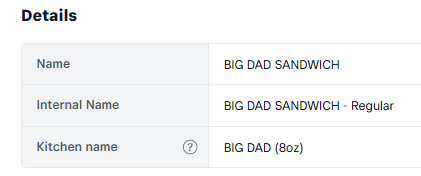
If the kitchen name is blank, then the kitchen printer will print the contents of the Name field instead. Over the next couple of weeks, items will have kitchen names added so that they will print abbreviated Names in the kitchen with recipe information that will fit on one line within the allowed 22 characters when possible.
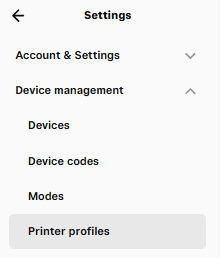
To enable or disable the printing of kitchen names go to Dashboard/Settings/Device Management/Printer Profiles
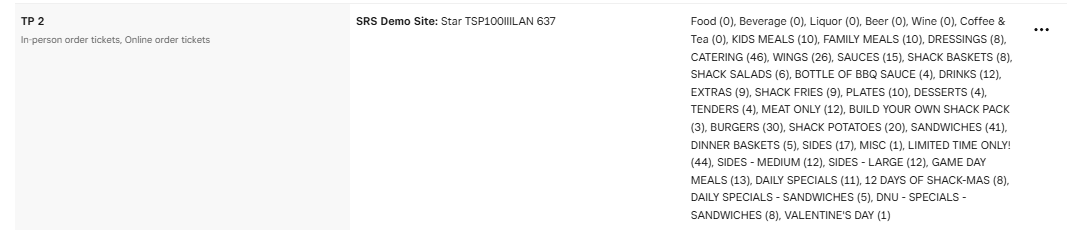
Select the kitchen printer and click on the " . . . " to Edit the printer's profile
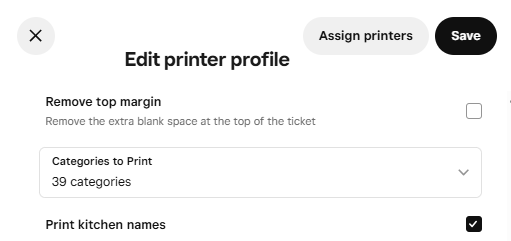
Then either select or deselect the Print Kitchen Names checkbox depending on your preference.
The printer that is recommended and that is compliant with Square is the Star TSP143III (LAN) printer. This printer is similar to the EPSON thermal printers that were used for years with the NCR system. The Star printer uses the same printer paper as the FOH printers, do not have ink cartridges, keep the paper flatter, are more legible and print much faster as seen in the picture above (Left receipt impact & right receipt thermal). The cost of these printers is around $260 to $350 depending on where you shop. The current downside of these printers is that they are quiet and do not have a chime notification that a ticket has been printed. With that said, this feature has been requested with Square and hopefully will be available later this year. The printers already have the capability to chime with the purchase of a compatible buzzer (~$55) but Square does not send the signal to activate the chime. The thermal printers have been successfully running at several stores for months now.
Leveraging this new capability is a time-consuming process to add kitchen names and test some 400 items and will be done over a couple of weeks. So, you can either enable kitchen printing and use the new kitchen names as we populate the kitchen name field or wait until all items are populated and train your staff accordingly. Keep in mind that the kitchen names are designed in length to fit the thermal printer which has 22 available characters as opposed to the current matrix printers that only have 15 characters. So, if you want to stay with the impact printers, you can still take advantage of the kitchen naming conventions that include recipe information, but the items will print on multiple lines instead of just one as seen in the picture above.
Standardized Abbreviations used for Kitchen Names
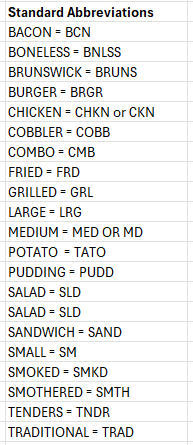
Standardized Abbreviations
Was this article helpful?
That’s Great!
Thank you for your feedback
Sorry! We couldn't be helpful
Thank you for your feedback
Feedback sent
We appreciate your effort and will try to fix the article