Use these instructions on GoParrot/Franchise Suite to change the order of categories (ex Plates, Sandwiches, Wings, etc) that are displayed online.
Steps to Change Category Order:
Go to GoParrot/Franchise Suite
Select Desired Store
Go to Categories
Click on Show Order
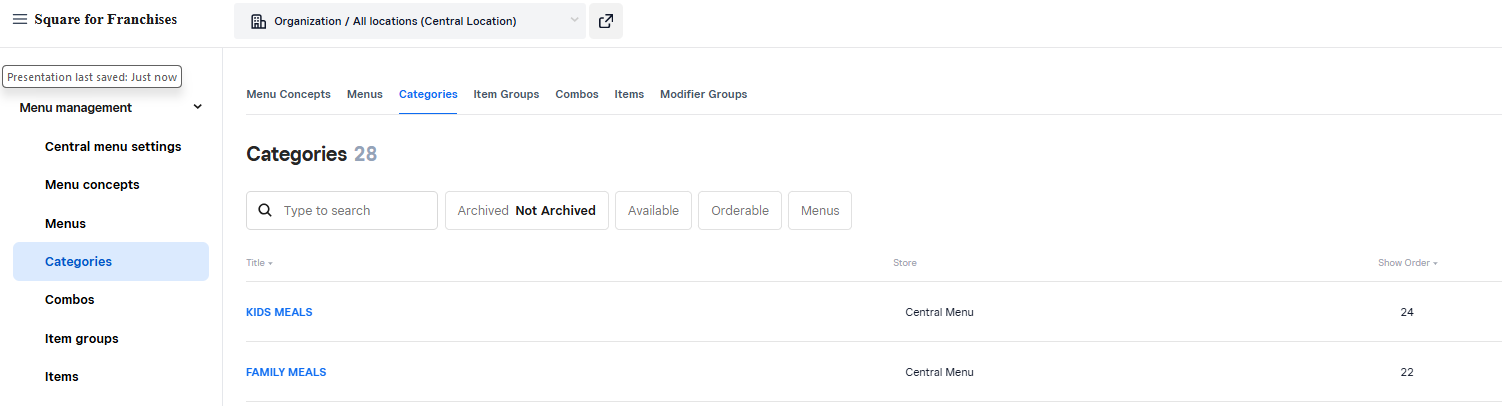
Click on Specific Category
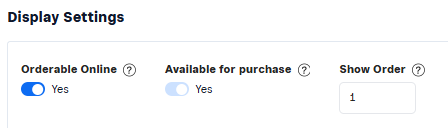
Change Show Order Number to desired position Number
Hit Save
Order Rules:
It is recommended to only use a number once.
If you use the same number twice then the secondary sort will take affect which is alphabetic
Set all categories that are not being used to a high number so they are out of the way. (ex 35 or 86)
Was this article helpful?
That’s Great!
Thank you for your feedback
Sorry! We couldn't be helpful
Thank you for your feedback
Feedback sent
We appreciate your effort and will try to fix the article